

As a small business owner or passionate creator, you probably already know the importance of connecting with your audience and building a solid brand presence.
But if you’re not entirely convinced yet, just ask any of the 90% of marketers who admitted to using social media for their business in a 2022 Hootsuite survey.
This guide is your ticket to understanding the ever-changing social media game.
We’ll cover everything from crafting a winning strategy to creating content that captivates your audience, and measuring your success like a pro.
Chapter 1: Understanding social media fundamentals
Each social media platform caters to a unique demographic and serves a different purpose. Let’s start with a quick overview of each of the major platforms:
- Facebook: This platform is particularly effective for building community, engaging with audiences through posts, live videos, and Facebook Groups. Businesses can benefit from its comprehensive advertising options and robust analytics tools.
- Instagram: Instagram is great for brands with strong visual content. It’s particularly effective for lifestyle, fashion, and beauty brands. Features like Instagram Stories, Reels, and IGTV offer diverse ways to engage with a younger, trend-focused audience.
- Twitter/X: A platform for real-time conversation, Twitter/X excels in real-time content. It’s ideal for businesses that want to establish thought leadership, engage in industry conversations, or provide customer service through its direct and public messaging capabilities.
- LinkedIn: The go-to platform for professional networking, LinkedIn is a powerful tool for B2B companies. It’s ideal for establishing industry authority, networking, and recruiting, with a more formal tone than other social platforms.
- TikTok: The newest player, TikTok, has revolutionized short-form video content. It’s an excellent platform for reaching a younger audience with creative, engaging, and often viral content.
The evolution of social media
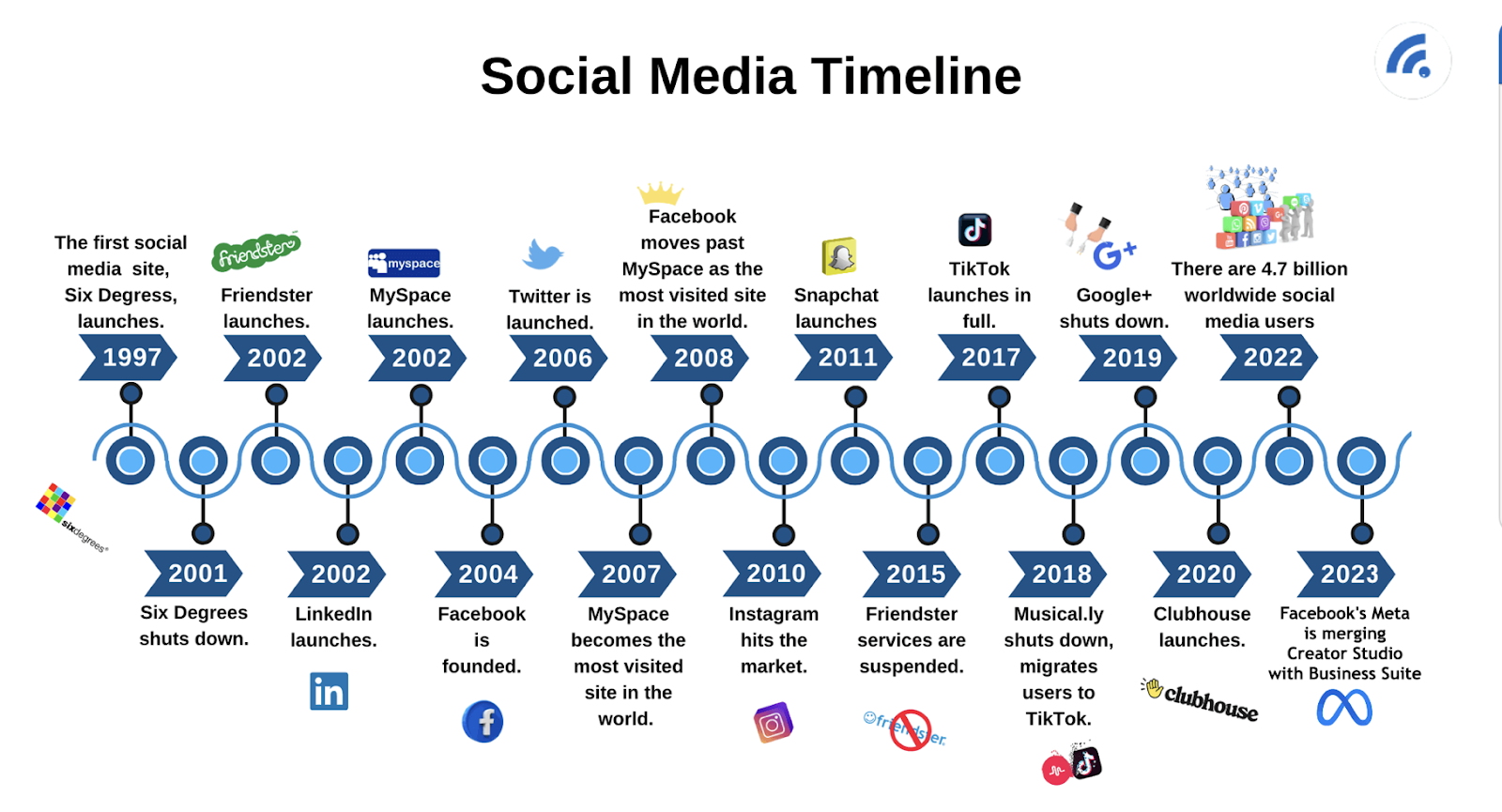
The evolution of social media over the years has been nothing short of remarkable, transforming from basic communication platforms to integral components of global digital marketing strategies.
Platforms like Friendster and MySpace marked the beginning of social media, focusing primarily on personal connections and networking.
The emphasis was on individuals sharing their experiences, thoughts, and interests, laying the groundwork for the user-generated content that dominates today’s social media.
With the advent of Facebook, Twitter, and later Instagram, the scope of social media broadened significantly. These platforms introduced features like news feeds, hashtags, and more sophisticated sharing options, increasing user engagement.
These platforms started evolving beyond personal use, becoming vital tools for news dissemination, political campaigning, and public discourse.
Platforms like Facebook and Instagram then began introducing advertising tools, allowing businesses to target users based on detailed demographics, interests, and behaviors.
The development of analytics tools gave businesses insights into user engagement and campaign performance, enabling more data-driven marketing strategies.
Key terms and concepts in social media
Engagement: Engagement refers to how users interact with social media content, including actions like likes, comments, shares, and views. It’s a crucial metric as high engagement often indicates content that resonates with audiences, playing a key role in building a strong online community and improving visibility.
Reach and impressions: Reach and Impressions are metrics that measure the extent and frequency of your content’s visibility. Reach counts the total number of unique users who see your content, while Impressions track how often the content appears. Understanding the difference helps in assessing how far and how often your content is being viewed.
Algorithm: Social media algorithms are the behind-the-scenes calculations determining content visibility in user feeds. These algorithms prioritize content based on factors like relevance, user preferences, and engagement levels. Grasping how these algorithms work is crucial for optimizing content strategies for better reach and engagement.
Content strategy: A content strategy in social media involves planning, producing, and managing content to meet specific business goals. This strategy should align with audience interests and preferences, and it encompasses decisions about types of content, posting schedules, and engagement tactics.
Hashtags: Hashtags are used on social media to categorize and enhance the discoverability of content. They are critical for extending content reach beyond existing followers, especially when using trending or relevant hashtags to tap into broader conversations.
User-Generated Content (UGC): User-Generated Content (UGC) is any form of content created by users instead of the brand, such as photos, videos, reviews, or testimonials. It’s valued for its authenticity and can significantly boost engagement and trust in a brand.
Influencer marketing: Influencer marketing leverages individuals with a significant and engaged following to promote products or services. This approach can effectively increase brand visibility, credibility, and drive sales, particularly when influencers align well with the brand’s values and audience.
Social media analytics: Social media analytics involves using tools and metrics to measure and analyze the performance of social media activities. Key metrics like engagement rate, reach, impressions, and conversion rates provide insights into the effectiveness of social media strategies and campaigns.
Social listening: Social listening is the process of monitoring social media channels for mentions and conversations related to a brand, competitors, or industry. It’s essential for understanding audience sentiment, gathering feedback, and gaining strategic market insights.
Virality: Virality refers to the extent to which content is rapidly and widely shared on social media. Achieving virality can significantly enhance a brand’s visibility and engagement, often leading to substantial growth in audience reach in a short timeframe.
Paid social: Paid social is the practice of using paid advertisements on social media platforms to reach broader and more specific audience segments. It complements organic strategies by targeting users based on specific demographics, interests, and behaviors, thereby driving diverse marketing objectives.
Community management: Community management involves managing and fostering relationships with a social media community. It includes moderating discussions, responding to comments, and engaging with users, which are all vital activities for building loyalty and maintaining a positive brand image.
Conversion rate: The conversion rate in social media marketing is the percentage of users who take a desired action (like making a purchase) after engaging with a post or ad. It’s a crucial metric for evaluating the return on investment (ROI) of social media efforts, especially in driving sales.
Social commerce: Social Commerce refers to the integration of e-commerce functionalities into social media platforms. This trend allows users to make purchases directly within the platform, streamlining the shopping process and leveraging social engagement to boost sales.
Chapter 2: Crafting your social media strategy
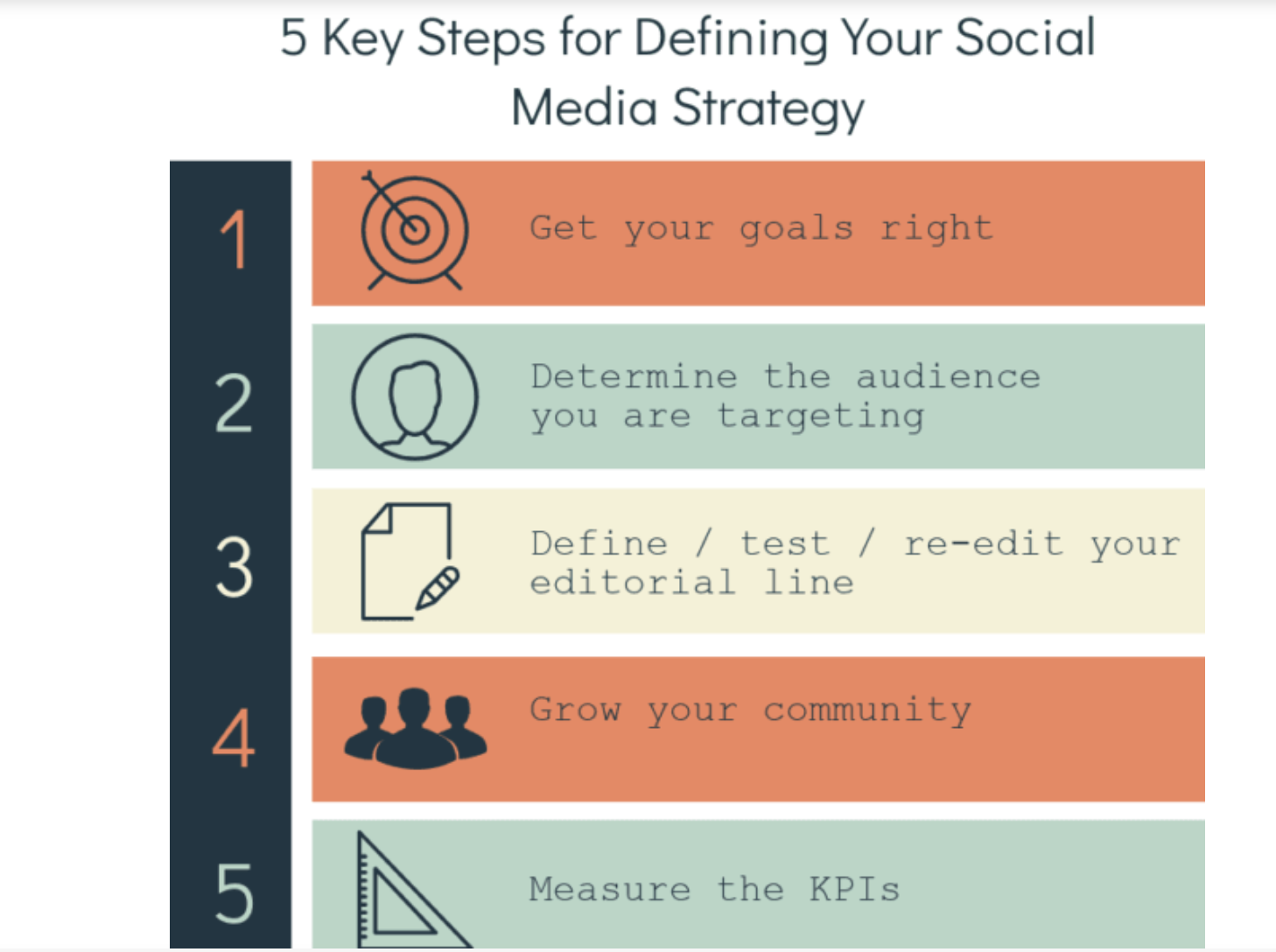
Crafting a compelling social media strategy is vital for small business owners and creators, simply because it helps focus on clear, specific, and achievable objectives.
Having a well-defined strategy in place helps with understanding:
Your Audience: What gets your audience going? Are they professionals browsing LinkedIn, or younger audiences devouring video content on TikTok?
What to Post: Does educational content work better for your niche? Or does giving importance to aesthetics matter? Ideally, a mix of educational, promotional, and user-generated content tends to succeed.
Brand Voice and Visual Aesthetics: What is your brand about and what are your guiding principles? Your social media strategy should reflect that consistently.
When to Post: When is your target audience online? Consistency and frequency is key.
Why To Post: Why are you building a social media strategy? Is it to build and nurture relationships, enhance brand visibility, or drive specific marketing goals?
Chapter 3: Content creation for social media
Creating engaging social media content is both an art and a science. Here’s a look at some guiding principles:
- Authenticity: This helps in building trust and fostering connections.
- Visual appeal: High-quality visuals and aesthetics are crucial, especially
on visual platforms like Instagram. - Diverse, valuable content: Engaging content should be valuable, whether for education, information, or entertainment. Storytelling can enhance emotional connections with the audience.
Relevance, interaction, and timeliness, including awareness of current trends and real-time engagement, are also key. Diversification in content types, tailored to each platform’s strengths, keeps feeds dynamic and engaging.
Find all our expert tips on creating great social media content here.
The role of a social media calendar
Once you know what you want to post and have a strategy in place, a social media calendar can help you execute your goals. It aids with planning and scheduling posts in advance and aligning content with marketing strategies and business goals.
Ideally, the calendar should include a mix of content types, optimal posting schedules, important dates, and themes for campaigns, providing a structured yet flexible framework for content delivery.

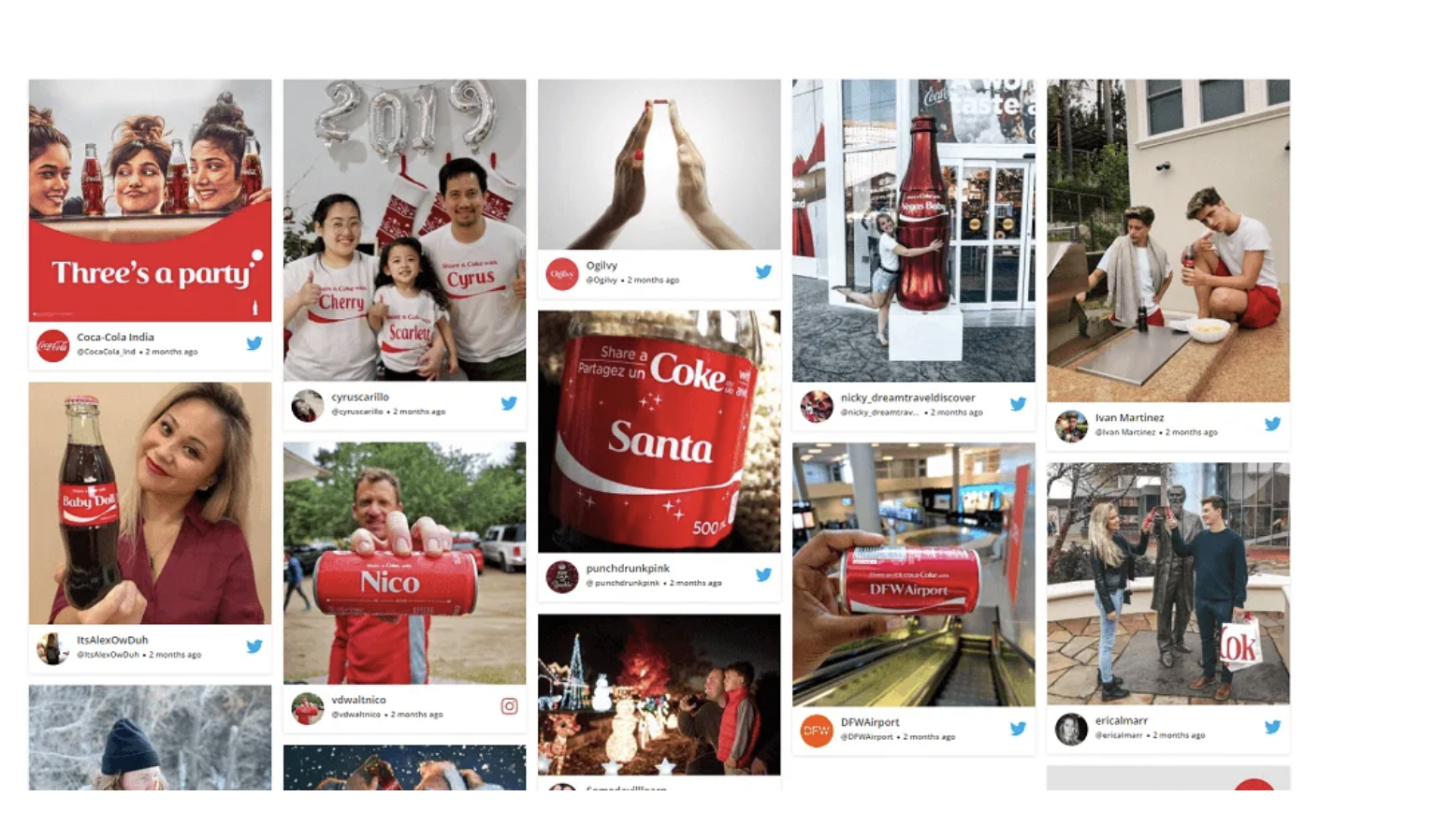
Remember – User-Generated Content (UGC) is pivotal, acting as social proof and enhancing engagement and authenticity. It varies from simple product photos to complex testimonial videos, reflecting the brand’s impact from the user’s perspective.
Additionally, each social media platform has preferences for different content types, such as images for Instagram, videos for TikTok and YouTube, stories for quick updates, live streams for real-time engagement, long-form content for LinkedIn, and interactive content for enhanced audience engagement.
Get access to strategies on making the best social media calendar here.
Chapter 4: Social media management for efficiency
Beyond basic scheduling and monitoring, tools like Hootsuite, Buffer, and Sprout Social offer advanced features like sentiment analysis, keyword tracking, and automated reports. This can help you understand your audience’s perception and refine your strategy.
These platforms often integrate with other tools such as Google Analytics or CRM systems providing a more comprehensive overview of your digital marketing efforts

Why you should use content management platforms
- Content optimization: These platforms often provide recommendations for optimal posting times and content formats based on analytics, enhancing engagement and reach.
- Crisis management: Quickly respond to negative feedback or crises by monitoring social conversations in real time, allowing for swift damage control.
- Streamlined management: Cross-platform integration allows for a unified approach to managing different social media channels, ensuring consistent messaging and branding across platforms.
- Efficient workflow: By managing all accounts in one place, you can save time and reduce the likelihood of errors, such as posting the wrong content on a platform.
Balancing automation with personal engagement
Effectively using automation in content scheduling can definitely help with efficiency.
Automating the publication of evergreen content and posts timed for peak audience activity can free up resources, allowing more focus on real-time engagement and fresh content creation. Setting up automated alerts for brand mentions or relevant keywords can facilitate timely and relevant interactions.
However, maintaining a personal touch in social media engagement is equally important.
Allocating specific times for live interactions, such as responding to comments or engaging with other users’ content, adds a human element to the digital interaction.
It’s important to balance automated responses with personalized communication, especially when addressing customer queries or feedback. This balance ensures that while efficiency is maximized, the authenticity and personal connection with the audience are not compromised.
To get actionable insights on how to be more efficient, read our guide on social media management.
Chapter 5: Growing your audience with social media marketing
Organic growth
Organic growth on social media refers to the natural increase in followers, engagement, and brand presence without paid promotion.
Central to this approach is engaging with followers. This engagement is more than just responding to comments; it’s about creating a community around your brand, fostering meaningful interactions that resonate with your audience’s interests and needs.
It’s vital for building long-term relationships with your audience, enhancing brand loyalty, and encouraging word-of-mouth promotion.
Using hashtags strategically is another integral aspect of organic growth. Hashtags function as discovery tools, helping users interested in specific topics or themes find your content.
By using relevant and trending hashtags, you can increase your content’s reach, connect with like-minded individuals, and even participate in broader conversations within your industry or niche.
Collaborations, whether with influencers, customers, or other brands, can significantly amplify your reach. These partnerships can take various forms, such as joint campaigns, co-branded content, or guest appearances.
They leverage the audiences of both parties, creating a symbiotic relationship that benefits all involved through increased exposure and shared resources.
Social media advertising
Social media advertising is another essential tool for extending your reach beyond organic growth. Different platforms offer various advertising options, each tailored to specific types of content, audience demographics, and marketing goals.
For instance, Instagram ads are visually-driven, while LinkedIn ads might focus more on professional content and networking.
The benefits of social media advertising are many. It allows for targeted marketing, reaching specific demographics, locations, interests, and behaviors, thus ensuring that your message gets to your desired audience.
Furthermore, the measurable nature of social media advertising provides insights into ad performance, enabling data-driven decision-making for future campaigns.
Getting started with social media advertising involves identifying your campaign objectives, such as brand awareness, lead generation, or direct sales.
A small-scale test campaign can be a practical approach, allowing for adjustments based on performance data. Choosing the right platform, crafting engaging ad content, and setting a realistic budget are also crucial steps in this process.
Learn how you can grow your reach with social media advertising.
Working with social media agencies
Social media agencies bring expertise and experience in crafting and executing effective social media strategies. When engaging an agency, you can expect them to develop a customized strategy aligned with your business goals.
This strategy typically includes aspects like content creation, platform selection, audience targeting, and performance metrics.
A social media agency’s role often extends to content creation and management, ensuring consistent and high-quality posts across channels.
They also handle engagement and community management, fostering interaction with your audience and managing your online reputation.
Analytics and reporting are other critical areas where agencies contribute. They provide detailed insights into the performance of your social media activities, including engagement metrics, audience growth, and return on investment.
For strategies involving paid advertising, agencies manage everything from creative development to targeting and budget management.
Chapter 6: Measuring success with social media analytics
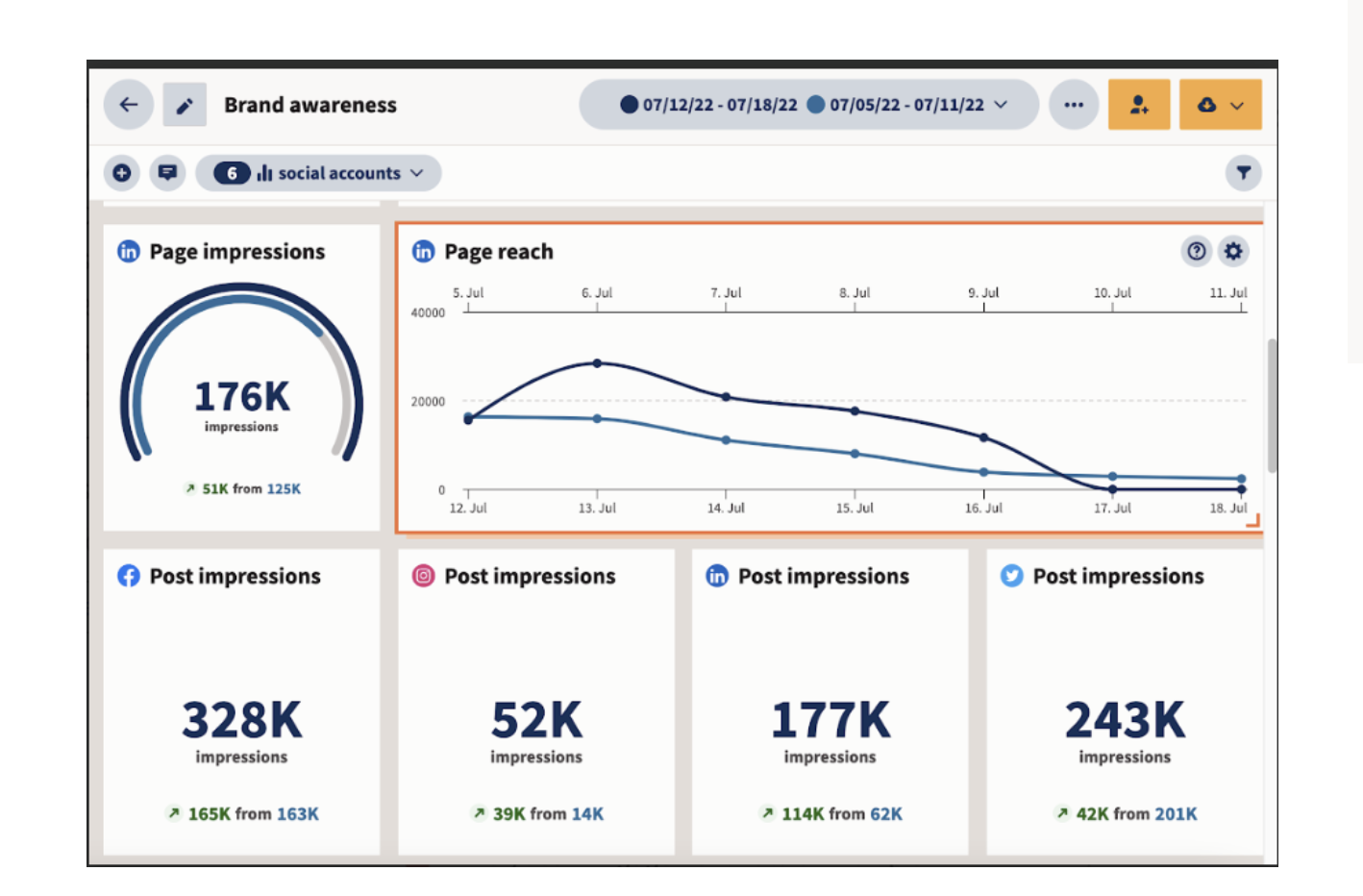
Native social media analytics tools, such as Facebook Insights and Twitter Analytics, provide detailed insights into post performance, audience demographics, and engagement.
Third-party solutions like Sprout Social and Google Analytics extend these capabilities across multiple platforms, offering comprehensive data on engagement rates, reach, click-through rates, and conversions.
Key metrics such as engagement rate, reach, impressions, click-through rate (CTR), conversion rate, customer lifetime value (CLV), social share of voice (SSoV), and referral traffic are critical for assessing how well content resonates with audiences, the effectiveness of social media in achieving business goals, and how a brand’s online presence compares to competitors.
This analytical understanding is crucial for refining social media strategies, enhancing content performance, and making data-driven decisions to achieve desired outcomes.
The importance of tracking and analyzing your social media performance
Regularly tracking and analyzing key metrics allows you to see what resonates with your audience, adjust strategies, and optimize future campaigns.
The way we measure social media success has evolved significantly. Initially, the focus was primarily on vanity metrics like likes and follower counts. Now, more comprehensive analytics offer insights into audience behavior, content engagement, and the actual ROI of social media efforts.
Linking social media metrics to overall business objectives is crucial. For instance, if the goal is brand awareness, tracking metrics like share of voice or brand mentions becomes important. For sales conversions, tracking click-through rates and conversion rates is key.
Real-world examples of successful social media analytics application
Dove’s Real Beauty campaign
Dove’s Real Beauty campaign, aimed at promoting body positivity and challenging beauty stereotypes, utilized social media sentiment analysis to gauge audience reactions and demographics.
This approach led to high engagement, particularly from women in certain age groups, and enabled Dove to continuously adapt their messaging, keeping the campaign relevant and resonant with their audience.

Airbnb’s user-centric approach
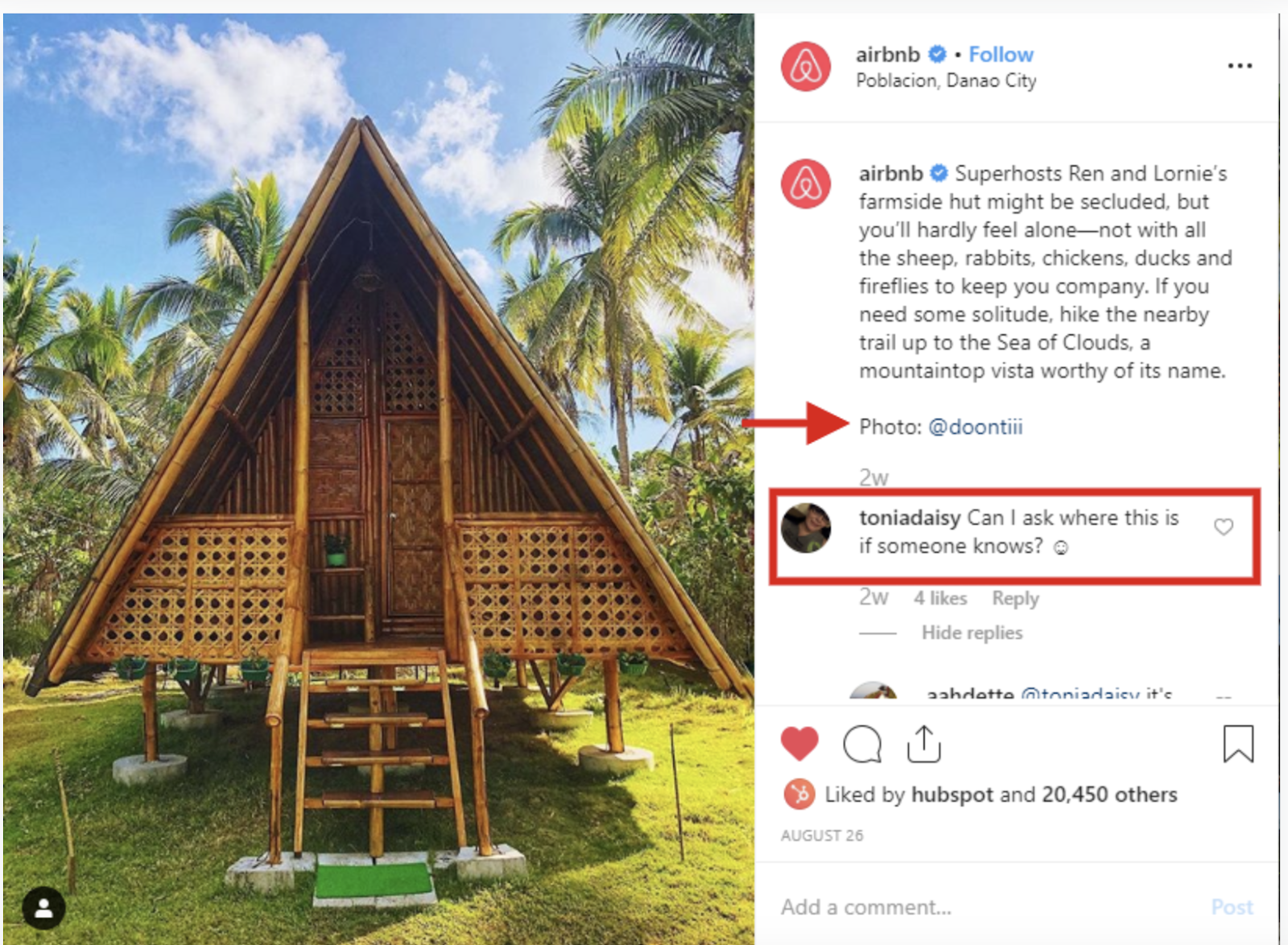
Airbnb’s strategy focused on user-generated content, tracking engagement and analyzing referral traffic from social media to their website.
This approach highlighted the value of authentic user stories in their marketing, led to better utilization of platforms for different campaigns, and optimized ad spending by concentrating on high-performing platforms and formats.
Wendy’s Twitter engagement
Wendy’s distinctive approach on Twitter, characterized by witty and bold engagement, involved close monitoring of engagement, reach, and public sentiment.
This unique social media persona resulted in viral content, setting Wendy’s apart in the fast-food industry. Competitive benchmarking was crucial in maintaining their distinctive brand voice and continuously innovating their social media strategy.

Chapter 7: Advanced techniques and trends in social media
Staying ahead in the dynamic social media landscape means keeping abreast of the latest trends and technologies. Here’s a look at some of the most impactful trends:
1. Augmented Reality (AR) and Virtual Reality (VR)
Brands are increasingly using AR and VR to offer immersive experiences. Gucci, for instance, has used AR for virtual try-ons of their products, while Nike has created VR experiences for product launches.
These technologies provide an engaging and interactive way for audiences to connect with products.

2. Ephemeral Content
Ephemeral content, like Snapchat Stories or Instagram Stories, disappears after a short period. This type of content is typically more casual and creates a sense of urgency and exclusivity.
3. Social Commerce
Platforms are increasingly integrating shopping features, allowing users to make purchases directly through social media. Instagram Shopping and Facebook Marketplace are prime examples of how social media is becoming a significant e-commerce platform.
Unpacking social media algorithms
TikTok algorithm
The TikTok algorithm primarily values initial engagement, showing new videos to a small audience first and expanding reach based on positive interactions like likes, shares, and comments.
Visibility is influenced by user interactions, video information (captions, sounds, hashtags), and user account settings (language, country). The algorithm favors content that sparks viewer interaction, uses trending sounds and hashtags, and encourages community engagement through comments and discussions.
Instagram algorithm
Instagram’s algorithm is engagement-focused, giving priority to content that receives more likes, comments, and shares.
It emphasizes relationships (showing content from regularly interacted accounts), user interests (content similar to past interactions), and timeliness (favoring recent posts).
To optimize for this algorithm, posting when the audience is most active, using engaging visuals and captions, and leveraging features like Instagram Stories are effective strategies.
Facebook algorithm
Facebook’s algorithm prioritizes content fostering meaningful interactions, especially from friends and family. Key factors include engagement (likes, comments, shares), content type (preference for video, particularly live video), and recency of posts.
Optimizing content for this algorithm involves creating conversation-driven posts, utilizing Facebook Live for real-time engagement, and regularly analyzing Facebook Insights to understand audience preferences and adjust strategies accordingly.
Learn about which social media platform is best suited to your goals.
Chapter 8: Avoiding common pitfalls
Common mistakes in social media marketing
1. Inconsistent branding: Maintaining a consistent brand voice and aesthetic across social media is crucial. Inconsistency can confuse the audience and weaken brand identity. Consistency in branding ensures a recognizable and memorable brand presence.
2. Inauthentic or overly promotional content: Authenticity is key in social media marketing. Inauthentic or overly promotional content can alienate audiences. Genuine content fosters trust and builds a stronger, more engaged community.
3. Neglecting audience engagement: Regular interaction with the audience is essential for building community and loyalty. Ignoring audience engagement can create a negative impression and diminish brand loyalty.
Learn how to avoid these mistakes with tips on social media marketing.
Navigating the challenges of social media management
1. Time management and content creation: Efficiently managing time and content is crucial for effective social media management, especially for small teams. Efficient management ensures a steady flow of quality content and better audience engagement.
2. Adapting to platform changes: Keeping up with the ever-evolving nature of social media platforms is vital. Adapting strategies in response to changes ensures continued effectiveness and audience reach.
Discover Essential Social Media Stats!
- Daily Usage Drop: In 2024, users spent an average of 143 minutes on social media daily, down from 151 minutes in 2023. This shift indicates a need for marketers to create more engaging content.
- Multi-Platform Activity: Users engage with an average of 6.7 different social networks each month, highlighting the importance of a broad presence across platforms.
- Primary Usage Reasons: The main reasons for using social media include staying connected with friends and family (56%) and filling spare time (38%). Other motivations include reading news and discovering content.
- Gen Alpha Shopping Trends: More Gen Alpha users are turning to social media for shopping inspiration, with an 11% increase in teens citing this as a key reason for their usage.
- Gender Demographics: Social media usage shows a slight male dominance, with 53.4% male users compared to 46.6% female users, indicating important demographic trends to consider in strategy development.
Stay ahead of the curve—explore these vital social media stats today!
Final thoughts
Mastering social media requires patience, persistence, and passion. As a small business owner or content creator, your unique story and approach are what will resonate with your audience. Keep iterating, stay authentic, and enjoy the journey of building long-term partnerships.
Your journey in this dynamic and exciting landscape has just begun. Embrace it with enthusiasm and optimism, and watch as it opens doors to new opportunities and successes for your brand or creative endeavors.
FAQs
1.What are the key social media platforms I should focus on for my small business or as a content creator?
Focus on platforms that align with your brand and audience. Facebook is great for community building and diverse demographics, Instagram for visual content and a younger audience, Twitter for real-time engagement, LinkedIn for B2B and professional networking, and TikTok for creative, short-form videos targeting a younger audience.
2. How do I measure the success of my social media strategy?
Measure success using key metrics like engagement rate, reach, impressions, click-through rates, and conversion rates. Tools like Facebook Insights, Twitter Analytics, and third-party solutions like Sprout Social provide comprehensive analytics to gauge your strategy’s effectiveness.
3. How important is user-generated content (UGC) in social media marketing?
UGC is extremely important as it provides authenticity and builds trust with your audience. It increases engagement and extends your content reach. Encouraging your followers to share their experiences with your brand can be highly beneficial.
4. What should I do if I lack expertise in managing social media?
Consider partnering with a social media agency if you’re scaling efforts or lack in-house expertise. Agencies offer strategic direction, content creation, and manage engagement and analytics. Alternatively, invest in social media training for yourself or your team.
5. How do I adapt my social media strategy to changing trends and algorithms?
Stay informed about the latest trends and algorithm changes. Regularly attend webinars, follow industry news, and be flexible in adapting your content and strategy. Regularly review your analytics to understand what content resonates with your audience.
